

We connected our own software to AI. Yours can be next.
WizzHire, our hiring, sales, and HR platform, now works directly inside Claude. Our customers use it every day, and so do we. Here is what that looks like, and what it means for your business software.
Your team probably already uses an AI assistant like Claude or ChatGPT. They ask it to draft emails, summarise documents, and think through problems. But when the real work starts, they leave the assistant, open your company's software, and click through screens by hand.
It doesn't have to work that way anymore. We connected WizzHire, our own platform for hiring, sales, and HR, directly to Claude. It's live for our customers today, and we run our own sales and hiring through it every day. This post explains what that means in plain terms, and why it matters if your business runs on software of its own.
What "connected to AI" actually means
The technology behind it is called MCP (Model Context Protocol). You don't need to know how it works. What matters is what it does: it lets an AI assistant safely use your software on your behalf, the same way a trusted colleague would.
So instead of clicking through ten screens, a WizzHire user just asks:
- "Who is away next week?"
- "Compare the three strongest candidates for the sales role."
- "Log the call I just had with this client and remind me to follow up on Thursday."
Claude does it, inside WizzHire, with exactly the access that person already has. It can't see anything they couldn't see themselves.
Today that covers almost everything people do in WizzHire, 88 different actions in all:
- Hiring: job openings, candidates, side-by-side comparisons, ratings, and notes.
- Sales (CRM): clients, contacts, deals, follow-ups, and the link between a client and the roles you're hiring for them.
- HR: people, time off, shifts, timesheets, onboarding, performance reviews, and surveys.
The real win: all your tools in one conversation
One connected product is useful. Several connected products in the same conversation is where the real time savings show up, because the assistant becomes the bridge between tools that were never built to talk to each other.
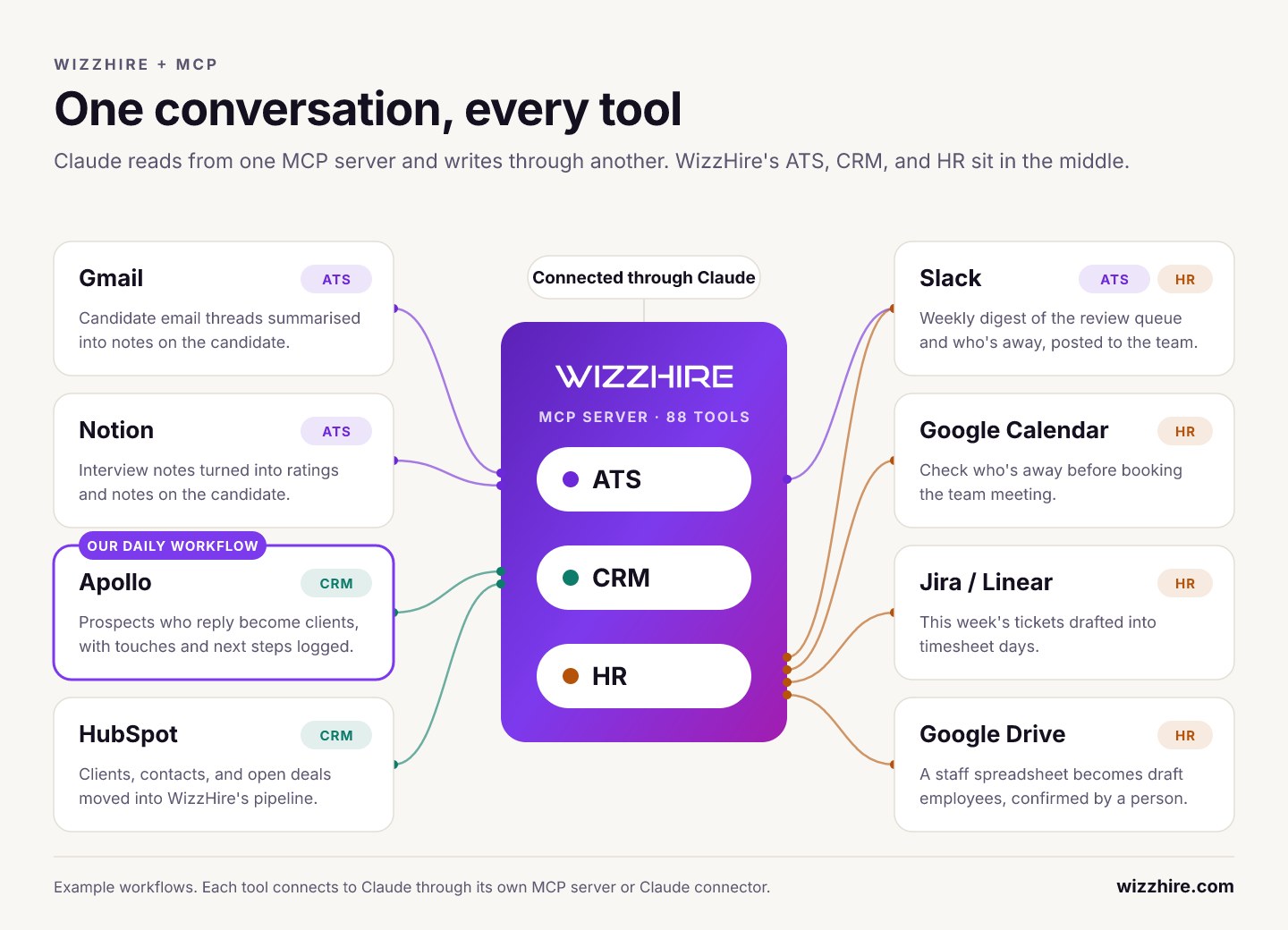
Here's how we use it ourselves. We find new prospects in Apollo, a sales prospecting tool that is also connected to Claude. Our client relationships live in WizzHire's CRM. At the end of the day, we tell Claude: "go through today's Apollo activity, add the companies that replied as clients in WizzHire, log the conversations, and plan the next step for each."
That's it. No exporting spreadsheets, no copying and pasting, no expensive custom integration between two products. Prospecting stays in the tool built for prospecting, and every real relationship lands in our CRM, where we track it in far more detail.
The same idea works across most of the software a growing company already pays for. Slack, Gmail, Google Calendar, Google Drive, Notion, HubSpot, Jira, and Linear can all connect to Claude today. A candidate's email thread becomes a note on their profile. Interview notes become a rating. A spreadsheet of staff becomes employee records, each waiting for a person to confirm. Every tool that connects makes the others more useful.
Safe enough for real people's data
WizzHire holds CVs, client deals, and employee records. Letting an AI anywhere near that data only makes sense if it's done carefully. Here is what we promised our customers, in plain words:
- You decide what it can do. When you connect, you approve it on a clear consent screen, and you can choose to let it only read, never change anything.
- It sees only what you see. The assistant has exactly the same access as the person using it. No more, no less.
- Some decisions always stay human. The AI can never reject or hire a candidate, and it can never delete anything. Decisions that affect people's lives stay with people.
- Big changes wait for approval. When the AI adds people in bulk, they arrive as drafts until a person confirms each one.
- You can always see what it did. Every change made by the AI is clearly marked, and every action is recorded.
- You can switch it off in one click. Every user can see which AI apps are connected to their account and disconnect any of them instantly.
Connecting takes about a minute: paste one link into Claude, sign in to WizzHire, and approve. No technical setup, no passwords to share, no IT ticket.
What it took
The first version went live in about three weeks, built by our own small team. Most of the effort didn't go into making the AI clever. It went into making it trustworthy: matching every permission in the app exactly, drawing clear lines around what the AI may never do, and testing every action thoroughly before any customer could use it.
That is the part that separates a demo from something you can let loose on your business data, and it's the part we now know how to do well.
Why this matters for your business
Your customers and your team are starting to do their work inside AI assistants. The software those assistants can reach will get used more. The software they can't reach becomes the tab people stop opening.
If your business runs on its own platform, whether that's a customer portal, an internal operations tool, a booking system, or a SaaS product, it can work the same way. Your users could ask an assistant to do in one sentence what takes them ten clicks today, and connect your product to the other tools they already use, without you building a single integration.
We've done it on our own product, live for real customers, with our own name on it. If you'd like to know what this could look like for your software, that's what our AI integration service is for, and the first conversation is free. And if you're curious what it feels like from the user's side, try WizzHire and connect it to Claude.